Agents vs Workflows: a technical breakdown
Every month someone tells me they built an agent. Then they show me a workflow. The distinction is architectural, and if you get it wrong your system breaks the day it ships.
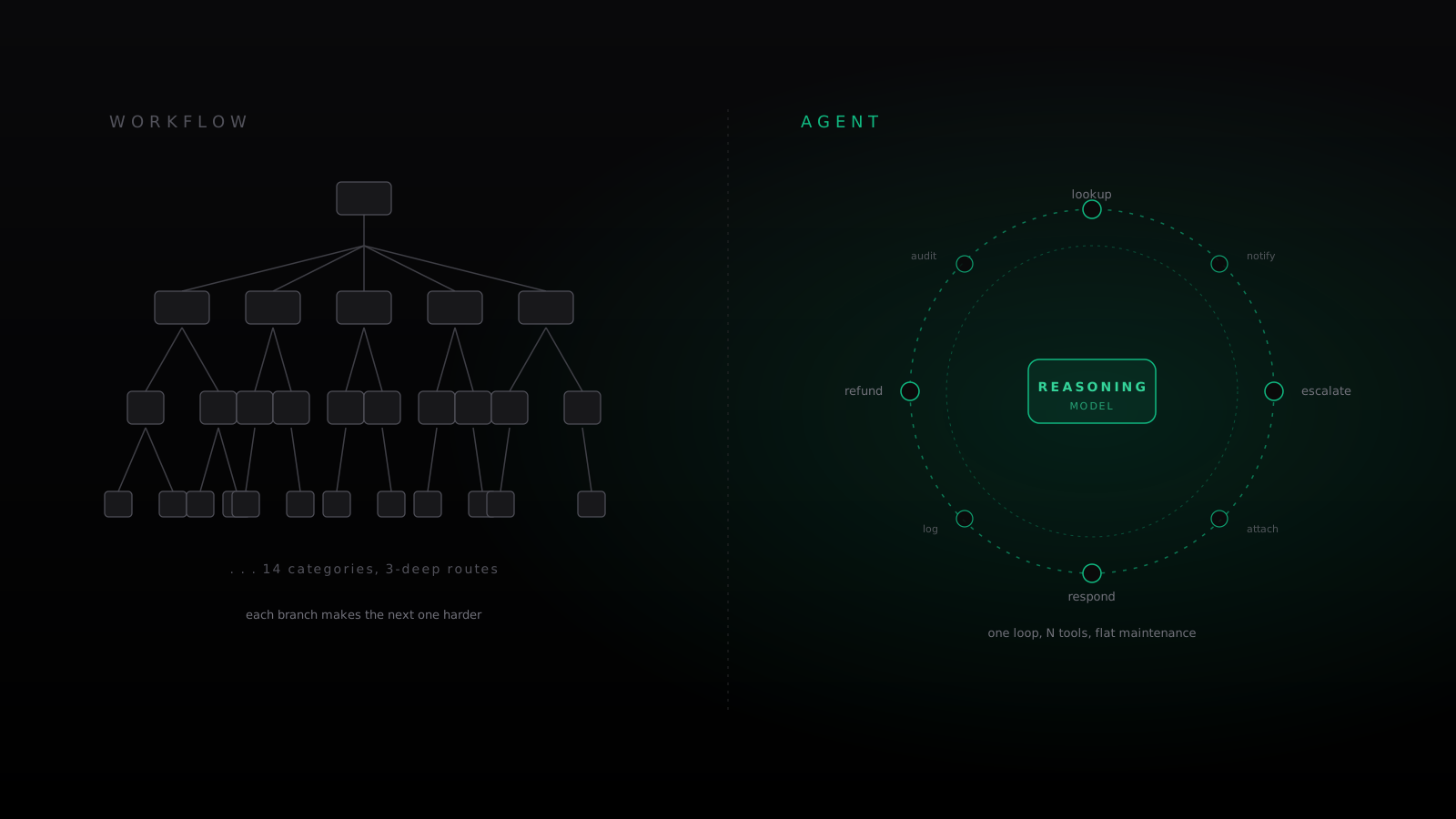
Every month someone tells me they built an agent. Then they show me a workflow. The distinction is not semantic. It is architectural, and if you get it wrong your system will break the day it ships.
The definition that actually matters
A workflow is a deterministic graph. You define nodes, edges, transitions. If input X arrives, run step Y. If Y returns state S, route to Z. The logic lives in the graph.
An agent is a loop around a reasoning model with access to tools. You give it a goal. It decides what to do next. The logic lives in the model.
Everything else — frameworks, orchestrators, DAGs, "AI workflows" — is decoration on top of one of those two primitives.
Where workflows break
Workflows are elegant until the world stops looking like the flowchart.
I looked at a support automation last month that started like this:
def handle_email(email):
    category = classify(email)
    if category == "refund":
        return run_refund_flow(email)
    if category == "technical":
        return escalate_to_engineering(email)
    if category == "billing":
        return route_to_billing_agent(email)
    return route_to_human(email)
Ships in a week. Looks clean in the retrospective. Breaks the first time a customer writes "I was charged twice, the product doesn't work, and I want my money back" — which in that team's data happened in 31% of tickets.
You add branches. The classifier gets a new category. Then the routes nest. Three months later, the team has fourteen categories, routes nested three deep, and nobody can answer the question "what happens if a VIP customer escalates on a weekend about both a bug and a refund."
The workflow has not scaled. It has calcified. Every new requirement threads through the graph, which requires understanding the graph, which nobody wants to do at 11pm on a Friday.
What the agent version looks like
Same problem, as an agent:
name: support
goal: resolve customer inquiries end-to-end
tools:
  - lookup_customer
  - issue_refund
  - escalate_to_engineering
  - notify_billing
  - respond_to_customer
No graph. No classifier. No category tree. The agent reads the email, decides which tools it needs, calls them, and responds. On the weird ticket — refund + bug + VIP at 11pm — it does what a reasonable human would: pulls customer history, checks the bug, flags engineering, offers a partial refund, writes a response that acknowledges all three issues.
Adding a new capability is adding a tool. Not restructuring a graph.
The maintenance asymmetry
The thing most teams underestimate is maintenance cost.
Workflows have a reverse-compound-interest curve. Every new branch makes the next one harder. You hit a wall around twenty nodes where nobody wants to touch the code and every PR is a three-page diff of conditional logic that was clean when it was written in isolation and incoherent when read together.
Agents have a flat cost curve. Adding a tool is adding a function. The agent figures out when to call it. You pay once, in prompt work, to explain what the tool does. You do not pay again when the tool needs to be combined with others in new situations.
This is why agents scale and workflows do not. It is not about "intelligence." It is about whether the branching logic lives in code you have to maintain or in a model you have to prompt.
When workflows are still right
Workflows are not dead. They are correct when three things are true:
- The space is bounded. You know every possible input.
- The stakes are high. You need the same deterministic output every time.
- The edges are rare. Unhandled cases are acceptable because they almost never happen.
Payroll. Fraud rules. Compliance. Billing reconciliation. You do not want an agent "figuring out" how to process a payroll run.
For anything with ambiguous input, open-ended goals, or a long tail of edge cases — which is most real work — workflows become debt the moment you ship them.
The hybrid that actually works
The strongest production systems are agents on top, workflows underneath. The agent is the decision layer. The workflows are the guardrails.
A finance agent can decide a transaction needs approval. The approval itself runs through a deterministic workflow with fraud checks and audit logging. The agent chose to invoke it. The workflow enforces it.
This is not "workflows with AI." It is agents calling workflows as tools. The distinction matters, because it determines who owns the branching logic — and the answer should almost always be the agent, not the graph.
How to tell which one you are building
If you are drawing arrows between boxes in Figma, you are building a workflow. If you are writing a system prompt and a tool spec, you are building an agent. If you are doing both, you have a workflow with an LLM call in it — which is a workflow, and which will break.